
Free budget app
Start tracking spending with Marble for $0.
Fast entry. Clear month. No bank login.
Record what you spend in seconds, then watch it land in the right category, envelope, and account, so the number you see is one you can trust.

Free on iPhone and iPad, with an optional Marble Premium subscription.

Capture a purchase while it is still fresh, then move on. There is no feed to babysit.

Every transaction updates category progress and what is safe to spend before your next decision.
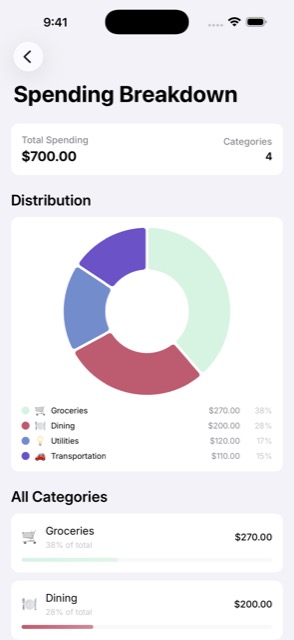
Breakdowns turn a month of spending into something you can actually read and adjust.
Marble connects each expense to the plan, so a tracker stops being a list of regrets and starts being a tool you use before you spend.
Yes. Marble lets you enter expenses, income, transfers, and planned transactions so the month stays easy to review.
No. Marble combines expense tracking with a monthly budget, categories, envelopes, accounts, shared budgets, and optional Premium planning tools.
Yes. Marble Premium adds unlimited recurring transactions for predictable bills, income, subscriptions, and planned spending.
Yes. Marble is available for iPhone and iPad.
Start tracking spending with Marble for $0.
See the simple rhythm behind the monthly workflow.
Track shared spending with your household.
Add an expense, see what is left, and stay ahead of the month, free on iPhone and iPad.